
Published 15 April 2025
SSD vs. HDD: What’s the Difference and Which One Should You Choose?
When it comes to choosing storage for your computer or server, you’ll likely come across two main options: SSDs (Solid State Drives) and HDDs (Hard Disk Drives). Each has its own strengths and ideal use cases, and understanding the differences can help you make a smart choice.
What is an HDD?
An HDD (Hard Disk Drive) is a traditional storage device that stores data on spinning metal platters. A read/write head moves across the platters to access and record data.
Key Features of HDDs:
Mechanical Operation: Contains moving parts, which makes it more vulnerable to shock and wear.
·Large Capacities: Commonly available in high capacities (up to 20TB+).
·Cost-Effective: Lower cost per gigabyte compared to SSDs.
·Slower Performance: Data access is slower due to physical movement.
·Best for: Long-term storage, backups, or storing large files like videos.
What is an SSD?
An SSD (Solid State Drive) stores data using flash memory chips and has no moving parts, allowing for much faster performance.
Key Features of SSDs:
·Speed: Much faster read/write speeds than HDDs.
· Durability: Better shock resistance and reliability due to no mechanical parts.
· Silent Operation: No noise during operation.
· Power Efficient: Consumes less power, making it ideal for laptops.
·Best for: Boot drives, running applications, gaming, and speed-sensitive tasks.
SSDs come in different form factors and use various interfaces. Here's a breakdown of the most common types:
- SATA SSDs (2.5-inch) are the most traditional form of solid-state drives and connect via the SATA III interface. They offer read/write speeds of up to 550 MB/s and come in a 2.5-inch size, similar to standard laptop hard drives. These drives are widely compatible with most desktops and laptops, making them a popular choice for users upgrading from an HDD.
- M.2 SATA SSDs use the same SATA interface as the 2.5-inch version but come in a much smaller, gumstick-shaped M.2 form factor. They offer identical performance to 2.5-inch SATA SSDs but require a motherboard with an M.2 slot that supports SATA protocol. They’re ideal for thin laptops and compact desktop builds.
- M.2 NVMe SSDs look similar to M.2 SATA drives but use the much faster PCIe interface and NVMe protocol. These drives offer significantly higher speeds—ranging from 1000 MB/s to over 7000 MB/s—making them perfect for demanding tasks like gaming, content creation, and workstation use. To use them, your system must support NVMe via the M.2 slot.
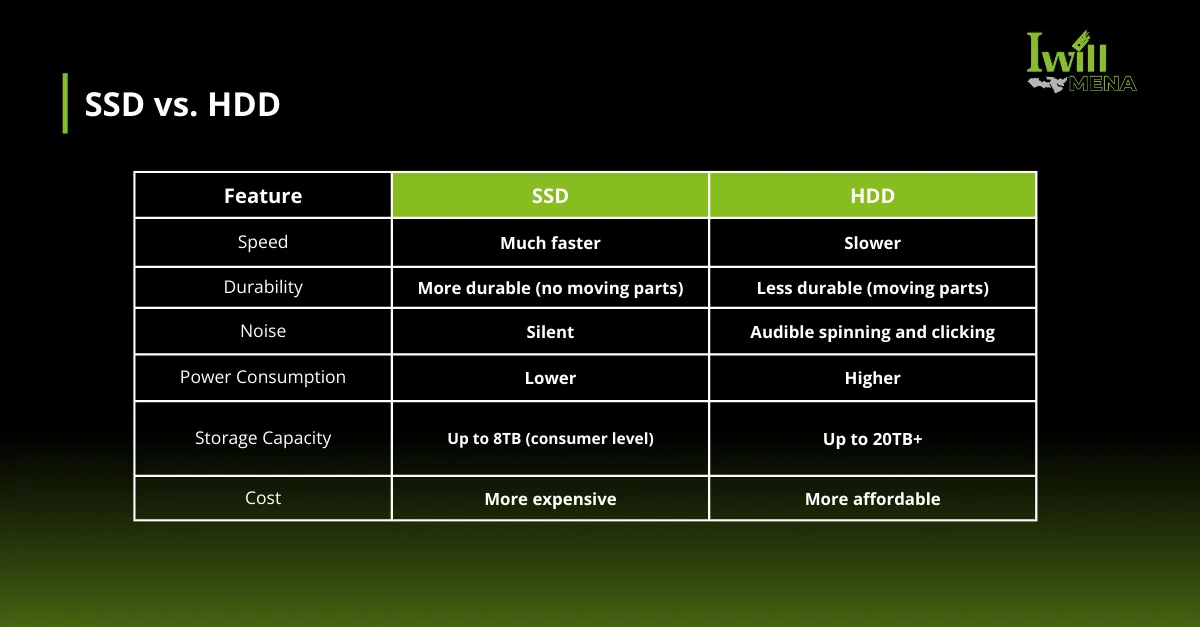
SSD vs. HDD
Speed and Performance
SSDs are much faster than HDDs since they use flash memory, making tasks like booting and file transfers quicker. HDDs are slower because they rely on spinning disks and mechanical parts.
Durability
SSDs are more durable with no moving parts, making them resistant to drops. HDDs are more prone to damage due to their mechanical components.
Noise and Power
SSDs are silent and consume less power, ideal for portable devices. HDDs are noisy and use more power because of their moving parts.
Storage Capacity and Cost
HDDs offer larger storage at a lower cost, making them great for bulk data storage. SSDs are more expensive per GB but offer better performance.
Lifespan
SSDs have a limited number of write cycles, but they last for years with normal use. HDDs last longer mechanically but are prone to failure over time.
Which One Should You Choose?
Choose an SSD if:
·You want fast performance and short load times.
·You’re doing tasks like video editing, gaming, or data analysis.
·You need something compact and shock-resistant for mobile use.
Choose an HDD if:
·You need a lot of storage at a lower cost.
·You’re building a media server, backup station, or archiving large files.
·Speed is not your primary concern.
Both SSDs and HDDs have their place in modern computing. For the best of both worlds, many users opt for a hybrid setup — using an SSD for the operating system and applications, and an HDD for large file storage. Ultimately, your choice should be based on your performance needs, storage requirements, and budget.
Need any advice on choosing the right storage solution? Contact us today to explore high-performance options tailored to your business needs!
Contact Us
IWILL MENA
Email: sales@iwillmena.com
Call: +852 914 61951